
In onscreen marking, one-time scanning eliminates the physical handling of the answer sheets. For physical answer sheet evaluation examiners need to travel to the respective exam centers for answer sheet evaluation. Onscreen marking removes this constraint, as examiners can evaluate the answer sheet from any location.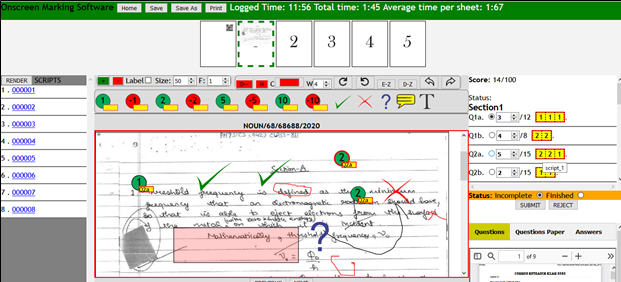
EXECUTIVE SUMMARY
- The proposal is for Onscreen Marking (OSM) Solutions. The objective is to improve the safety, reliability and quality of marking examinations.
- The document is based on the information obtained from the trusted sources.
- The objectives would be to enhance reliable and quality marking, more efficient use of examiner skill sets, an increase in the speed of marking, reduce the risks associated with transporting exam scripts between centers and examiners, reduce the risks associated with the influence of a single examiner marking a whole exam script, real-time monitoring of marking progress and continual monitoring of marking quality
- The Optimization will be done in a strategic step by step OSM management process.
- Reduces the risk associate with of direct contact with paper used by other persons in curbing the spread of likely infectious disease such as COVID-19.
- The complete process solely depends on the features that are to be implemented on the OSM solution and resources made available but certainly not exceeding 4 weeks (1 month).
- We offer a scanning capacity of over 15,000 scripts daily (24 hours)
- The estimated cost of the complete project is presented in The Cost Estimates.
- The design of the proposed OSM software will be flexible to changes depending on our clients’ preferences.
- The OSM software will be done by a professional team of dedicated & experienced staff. Our Team has handled innovative brands image processing technologies, Enterprise Management and Education Technologies.
Key Features of our OSM Software
- Dashboard – Intuitive overview with real-time insights into marking progress, pending tasks, and key statistics.
- Profile Management – Secure user profiles with customizable settings and access controls.
- Cascading Marking Groups – Flexible faculty/department hierarchy for streamlined examiner assignments.
- Submission Management – Efficient handling of submitted scripts with tracking and verification.
- Cluster Management – Organize scripts into clusters for bulk processing in a single submission.
- Script Management – Advanced tools for sorting, filtering, and managing examination scripts.
- Account Management – Role-based access for examiners and examinees with permission controls.
- Subscription-Based Marking – Flexible plans for institutions and individual markers.
- News Feed – Updates, announcements, and important notifications for users.
- Notifications – Real-time alerts for submissions, marking progress, and system updates.
- Marking Window – A powerful interface for efficient and accurate grading, featuring:
- Flexible Script Zooming – Adjustable zoom levels for better readability.
- Question Preview – Quick navigation between questions.
- Answer Key & Marking Scheme – Reference correct answers and grading rubrics.
- Auto-Score Calculation – Instant tallying of marks for accuracy.
- Group Scoring – Aggregate scores by question or section.
- Marker Assignment – Allocate examiners to specific score groups.
- Save & Resume Marking – Progress is saved automatically.
- Interactive Preview & Guide – Visual aids and marking guidelines.
- Screen Annotations – Freehand drawing, highlighting, and comments.
- AI-Assisted Marking/Auto Marking (Coming Soon) – Smart suggestions for consistent grading and auto grading.
OVERVIEW
Evaluation is a necessity in an education system, playing a key role in determining the success of its core teaching processes and methodologies. It is imperative that these are conducted in a fair and effective manner to produce the desired results. Paper based summative assessment is the standard approach adopted by educational bodies for assessing candidates. Educational bodies have the responsibility of ensuring that the examination standards, quality, and relevance are maintained across the entire examination process, critical to the development of a progressive education system.
Conducting paper-based exams with increasing number of students in institutions is becoming a more tasking job and challenging on the part of the examination organizers, the volume of script to be managed become very much larger, requiring extensive strategies to beat target intervals for examination sheet marking, result processing, approval and release. The sheer volume of candidates also creates a significant burden on the educational /examination bodies in terms of the cost and effort spent in their evaluation. When it necessitates the Right to Information (RTI) of Examinee when legal cases arise, the need for storing and preserving physical answer scripts which can be very difficult, time consuming and costly affair for educational/examination bodies to maintain maximum security of scripts from both human and non-human caused disasters.
Examination processes involve many manual procedures, such as the collection of scripts from different examination centres, distribution of scripts to markers, return of marked scripts, and calculating, recording and rechecking of marks. These are highly error prone tasks and may result in discrepancies creeping in at any stage of the process. Also, the operational risks associated with secure transfers of such large volumes of paper scripts further add to the process complexities. Any totaling error or unchecked questions, misplaced/mutilated answer scripts can be detrimental to the candidate's career as well as affect the institution's reputation. Advanced technological tools can innovatively resolve this for educational bodies, allowing them to streamline the entire process through smart and operationally effective processes. On-Screen marking is an innovative solution that allows paperless evaluation and online storage mechanism for examinations held on national and international level.
KEY CHALLENGES
• Large number of paper scripts to be handled during whole marking process
• Logistics-Risk of misplacing answer scripts during distribution
• Labour intensive process of sorting exam scripts and allocating them to the right examiners
• Erroneous tabulation leading to inconsistency and delays in evaluation
• Lack of real-time information about the operations under way
• Risk of errors during the manual entry of exam results
• Time delays and costs implications of coordinating with various agencies involved in the process.
• Storing and preserving physical answer scripts to comply with retention policy, leading to severe space constraints Key Challenges
• Protecting qualification integrity and ensuring fair outcomes for all candidates taking examinations and assessments
• Optimizing efficiency and accuracy of the marking process ensuring the right results for candidates
• Completing marking and publishing results on time
• Recruiting and managing large numbers of markers
• Remote marking and monitoring of marking processes
• Managing the delivery of scripts to markers
• Managing malpractice and protecting against bias
What is On Screen Marking (OSM)?
Onscreen marking in an extensive evaluation procedure using enterprise level software that involves the process whereby pen-and-paper based answer scripts are scanned using high-speed scanners, electronically identified (We propose the use of barcode scanning technology) with students information and distributed to devices of markers like laptops, pads, tablets devices capable of running the on-screen mark allocation module of OSM or using web browsers. The marking processes involves inputting marks by clicking or typing whereby marks are automatically calculated stored in secured result databases in real-time for further computation, analysis and presentation. Marks assigned by examiners as well as their comments and annotations are captured by the software throughout the marking process.
The entire marking process replicates the pen and paper-based marking in a cost-effective and highly efficient manner. It conserves the advantages of pen and paper-based testing, while automating the whole marking process.
QR-code are affixed to the answer sheets as stickers for individual identification of scripts for sorting and processing.
KEY FEATURES
Answer Script Digitization
• After examination, answer scripts are collected and sent to a secure scanning facility, capable of processing huge volumes of scripts
• Answer scripts are scanned using high-speed scanners and uploaded into the On-Screen Marking system for further processing
• No paper scripts are sent to examiners
Examination Administration
• Administrator and Senior Examiners can configure complete examination related activities through this module
• Subjects, question papers and marking schemes are managed in a paperless environment
• Administrator can configure and initiate practice and live marking sessions
Practice Session/Standardization
• Senior Examiner prepares a practice kit for training of examiners using actual sample of examination scripts
• Examiners are required to mark the scripts in practice kit and submit it for review to senior examiners
• After reviewing the marked scripts, senior examiners certify examiners for live marking
Live Marking
• Electronic allocation of answer scripts to certified examiners.
• Examiners mark allocated answer scripts using OSM software on computer screens within the stipulated time.
• Sample of marked answer scripts of examiner sent for review to senior examiners.
Dashboards
• Senior examiners can monitor the progress of all the examiners in real time having a better control over the entire marking process
• Data gathered from marking can be used for analysis to gain deeper insights into performance
Result Compilation
• Post completion of script checking, marks are exported for preparing results in multiple formats such as EXCEL(.XLSX), .CSV, .JSON, .PDF, etc.
• Results can be compiled in batches or selectively as per the needs of the user
Marked Scripts Archival
• All marked answer scripts are archived in Document Management System for long-term preservation of the answer scripts
RTI Compliance
• Archived answer scripts can be easily searched and retrieved online. As per the requirement, marked scripts can be made available to candidates immediately for verification purposes
Available on Cloud
• On-Screen Marking system is offered both on premise and Cloud mode
Types of marking processes supported
• Whole script marking: This involves a single examiner marking a whole script at a time.
• Item/Multi-Marker marking: This involves examiners marking specialized areas of the script which can be simultaneous with other examiners marking the same script. Specific percentage is allocated to each Marker and the number of responses that can be scored per examiner is granted by the senior examiner or course coordinators.
Features of proposed OSM software
1. User account management i.e. addition, modification and deletion of Evaluator and Moderator.
2. Answer script management i.e. mapping of answer scripts.
3. Security setting for setting of passwords.
4. Provision for marking of question by Evaluator as evaluated, optional, marked for review or not attempted.
5. Evaluated check box to ensure that Evaluator has visited each and every page of an answer script
6. Evaluator comment box for each question.
7. Provision for zooming of answer scripts for proper viewing.
8. Provision for skipping/rejection of an answer script by an Evaluator if pages are repeated, in different medium/subject or not properly scanned accompanied with detailed reason for action.
9. Provision to save an answer script as draft to evaluate at a later stage on the same day.
10. Provision for moderation of any answer script by the Moderator.
11. Provision for viewing of evaluated answer scripts by the Moderator.
12. Command center to know the status of overall evaluation at the evaluation center.
13. Provision of forecasting report of evaluation to enable the University to know the timeline to complete the entire evaluation process and number of evaluators / Moderators required.
14. Provision of restriction of evaluation/ moderations time as the evaluators and moderators can perform actions only in the time stipulated by the University.
15. The OSM system has dashboards displaying the following:
(i) Daily and consolidated Evaluators’ attendance
(ii) Daily and consolidated Moderators’ attendance
(iii) Daily and consolidated Subject-Medium wise Evaluator details
(iv) Daily and consolidated Subject-Medium Wise Moderator details
(v) Skipped Answer script Details (till date)
(vi) Overall Subject-Medium wise Evaluation (till date)
16. Providing password to each and every Evaluator through Authorized Representative nominated by Vice-Chancellor of the university and the password has to be changed on the 1st day.
17. The delivery of OSM via LAN/WLAN/Broadband based at evaluations centers.
18. Date wise working hours report of Evaluators and Moderators
19. Availability of answer scripts, question paper and marking scheme on the computer nodes of each and every Moderator and Evaluator.
20. After scanning of answer scripts, the delivery of digitized answer scripts to the Evaluators can be by any secured mode.
21. Enabling of security settings for Reviewer’s authentication.
22. Maintaining audit log of each and every Moderator. Evaluator and IT Manager of the Implementors.
23. Provision for forgot Password and secret question settings.
24. Annotation of each and every question and page of answer scripts.
25. Provision of timer on computer node of each and every Evaluator to know the time taken in evaluation of answer script.
26. Provision for subject/medium wise selection of answer script.
27. Provision of message broadcasting to evaluators/moderators
28. Provision for configuration of multi—lingual question paper where necessary.
29. Provision of selection of question paper by Evaluator If a subject-medium has multiple question papers with set categorization; the evaluator can choose the appropriate question paper from the question paper list.
30. Provision of re-opening of submitted answer script by Moderator for evaluation in case of any need for correction on the same day of evaluation.
31. Evaluators and Moderators online feedback.
32. Provision for moderation based on the rules shared (No of Answer script will be moderated).
33. Provision of setting of minimum time of evaluation of an answer script to avoid fast and possibly inaccurate evaluated answer script.
34. Setting of limit/ceiling for maximum number of scripts to be evaluated by an Evaluator.
35. Mandatory provision for evaluation of 10% (can be changed from time to time) answers script by the Moderator.
36. Detailed audit log of evaluation.
37. Provision for PDF / JPEG/ HTML view of answer scripts.
38. Provision for Subject — Medium wise Evaluator report for moderator to generate the report of evaluation for a subject-medium-evaluator combination during any date range in the evaluation period.
39. Provision of viewing answer scripts in landscape/portrait orientation.
40. Provision of revisiting/editing the marks/evaluation by evaluator of evaluated answer script on same day.
41. Provision of easy assignment of marks as the evaluator can assign full or 0 marks for an answer by selecting the same from the drop down at the question level. In case of sub—questions, the full or 0 marks are awarded automatically.
42. Provision of key board shortcuts to enable evaluator to evaluate the answer scripts faster.
43. Provision for Evaluation of answer scripts by two (2) or more different evaluators (subject and medium wise).
44. The following reports needs to be generated by the OSM software:
i. Date wise Moderators and Evaluator attendance report
ii. Subject-Medium wise Evaluator detailed report
iii. Subject-Medium wise Moderator detailed report
iv. Skipped answer scripts' detailed report
v. Overall Subject-Medium wise Evaluation report
vi. Evaluator detailed report
vii. Variance report in case of discrepancy in the marking of Evaluator(s) and Moderator(s)
45. Printing of answer script(s) with all annotation of marks (for example Tick right or wrong). If marked by Evaluator as per requirement.
46. We offer a scanning capacity of over 15,000 scripts daily.
THE BENEFITS
On Screen marking is well established in many regions of the world and the benefits are well proven. These benefits typically include the following:
Turnaround Times
• The OSM solution introduces a range of efficiencies that can significantly reduce the time to mark scripts and publish results:
• Markers can mark more quickly when using OSM compared to traditional methods
• Markers save time the marking Multiple-Choice responses because OSM is built to parse response automatically
• Markers can focus on marking and are not required to carry out administrative tasks such as totaling individual marks
• OSM automatically monitors and identifies marking quality issues, stopping poor performing markers quickly to allow retraining or removal
• Administrators have a clear view of progress of marking in real-time
• Marking work can be instantly reallocated to other markers where necessary ensuring efficient load balancing of marker teams
Cost Benefits
The use of OSM can bring about substantial cost savings.
Our existing customers have benefited from:
• Reduction in marking turnaround time saving marker costs in transportation, accommodation, subsistence as well as marking centre costs
• More efficient utilization of differing marker skills, allowing specialist markers to focus on marking just their areas of expertise with clerical markers utilized for less complex candidate responses
• Reduction in the amount of checking and data entry
• Logistical savings and reduction in physical script movements
Marking Quality
OSM solutions offer advanced automated quality control methodologies to achieve marking quality:
• Real-time review by senior markers of marked scripts
• Automated checks on quality of marking
• Immediate and real-time tracking of quality of marking
• Immediate and real-time resolution of marking issues
• Reporting, auditing and tracking of quality control process
• Reduced marker bias
• Ability to continually measure all markers against agreed standards
Efficiency
Automation of manual tasks allows focus on the process of marking by:
• Automated allocation of marking
• Reduction in overall processing time
• Script retrievals are available at the click of a button
• Reduction in issues caused by human error
Management
Real-Time and accurate data supports informed decision making:
• Real-Time reports allow immediate corrective actions
• On-screen reports and administration provides control of the management of remote marking
• Access control allowing only the right people to get the right information
• Reporting, auditing and tracking of quality control process
Innovation
Continuous improvement of standards by embracing the benefits of technology:
• OSM is transparent and flexible
• Quicker access available to marked scripts for candidates, administrators and regulators
• Customer focused development
Security
OSM solutions reduce potential security risks and improve data and script protection:
• Script images transferred electronically with full audit trail
• Reduced risk of script damage or loss during the marking process
Anonymity of data
Electronic data held and access controlled to international security standards
Objectivity/Malpractice
Marking on-screen allows sensitive script data to be hidden for student anonymity and provides simple malpractice management:
• Anonymity of scripts
• Reduced marker bias in marking panel
• Escalation of issues of malpractice concern
• Audit trail of activity
• Case management for suspected malpractice
Types of scanning
They are majorly two types of scanning procedures we propose for the implementation of the OSM solution. The choice of the scanning procedure is dependent the type of paper used. The scanning types are the Booklet Scanning Procedure and Long paper scanning procedure. The choice of any or both these will be tendered on based on requirement by the examination council of the university. They are further explained below:
- Booklet scanning procedure: The booklet scanning procedure requires the use of automatic high-speed booklet scanners or the use of programmed position digital camera as scanners without unfastening the staples of the answer booklets
- Long paper scanning procedure: This procedure requires the use of single long folder paper as the examination answers sheet. This is to be used with a long paper high-speed scanners and it is also capable of scanning both faces of the paper and the same time as shown in the images below.